Grandma’s care shouldn’t be a game of telephone.
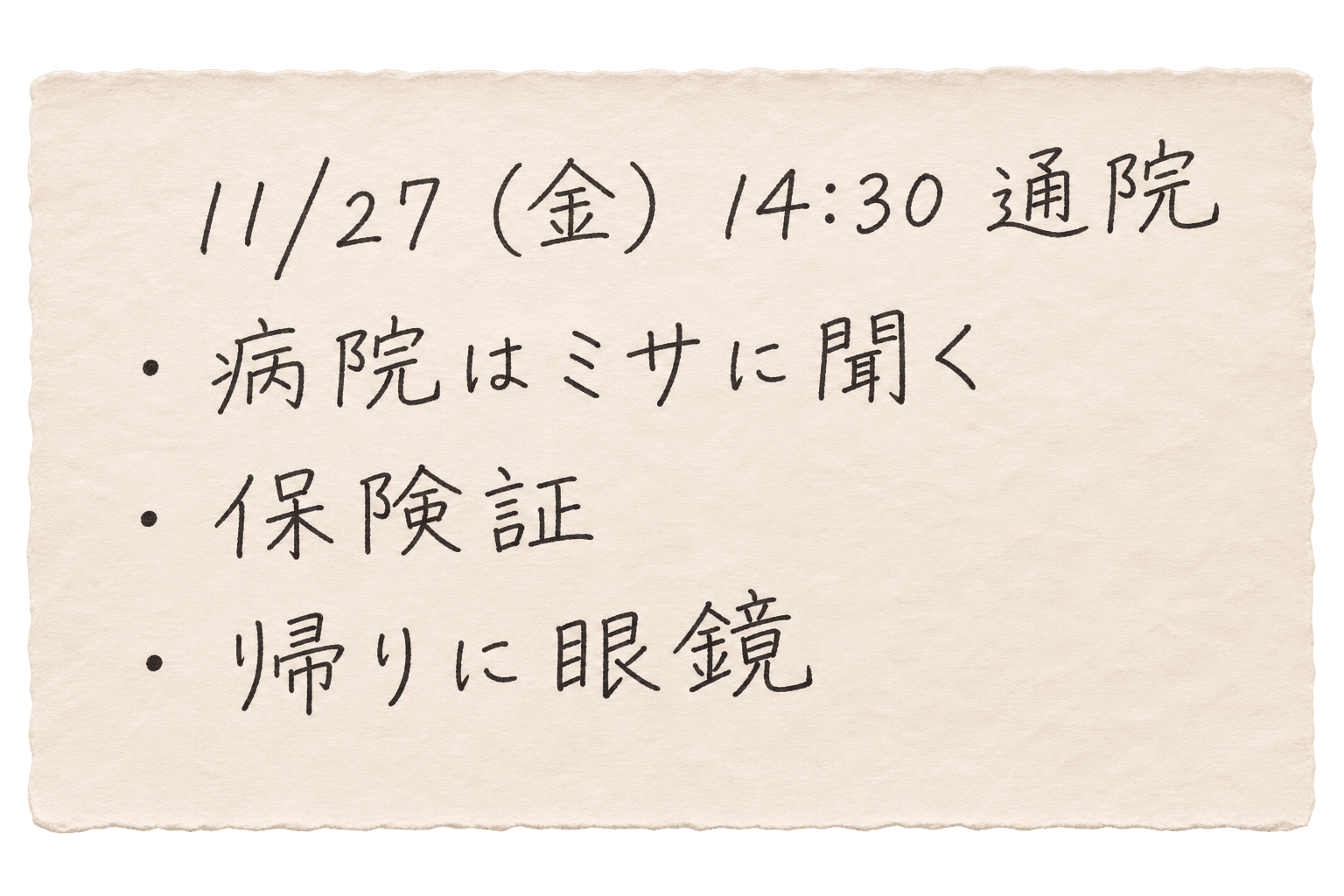
“Grandma has the clinic on Friday.” What time? Which clinic? Who's going with her?Take a photo of a handwritten note, and Fudepan turns it into a list of tasks your family can share.
Try the quick demo
 Misa
 Kenta
 Yui
One note, and the family can act.
From a handwritten note to errands your family can take on.
A made-up family. You can act as Misa, Kenta, or Yui. Nothing is saved or sent.
How Fudepan works
Take a photo
Take a photo of the handwritten note with your phone.
Split into tasks
It reads the note and makes a task list. It never guesses what the note doesn't say. It shows “not confirmed”.
Share the tasks
Your family decides who does what.
A person confirms what matters
Clinic visits, payments and similar tasks can't be marked as done until the primary caregiver confirms them.
Acting as Yui




Grandma
0 of 4 done
Grandma's photo changes each time a task is done.
Friday clinic visit
Fri, Nov 27, 2:30 PMfrom the note
Get the insurance card ready
Misa, the owner, can mark it as done.
- Owner
- Misa
Confirm the clinic
Person to ask: Misa (the note says “Ask Misa which hospital”)
- Owner
- No one yet
Go with her to the clinic
Clinic name not confirmed (ask Misa)
Nobody is going along yet
- Driving
- Kenta
- Going along
- No one yet
- Owner
- Kenta
Can't be confirmed or marked as done until the clinic name is saved and someone is going along.
Pick up glasses on the way home
- Owner
- No one yet
Tap a face to choose who you are. Drag a face onto a task, or press “I'll take it”, to take it on as that person.
Thanks this week
Tasks done on this made-up note.
No tasks are done yet. They show up here when they are.
How it works
Take a photo of the note
Take a photo of Grandma's handwritten note with your phone.
Fudepan reads it
It splits the note into tasks. It never guesses what the note doesn't say, like the hospital name. It shows “not confirmed” and asks your family.
Your family takes it on
Each person chooses what they will do. When a task is finished, they mark it as done.
When confirmation is required
These stay at “Requires confirmation” even after someone takes them on. They can't be marked as done until the primary caregiver confirms them. Fudepan never decides or does them by itself.
- Clinic visits and questions for the hospital
- Rides and going along
- Picking up medicine
- Payments
- Insurance and government paperwork
- Messages to people outside the family
Fudepan does not diagnose or give advice about medicine. For health questions, it adds a task to ask a doctor or pharmacist.
Built with Kiro
One rule from the Kiro spec, followed to the rule's test and to the example above.
- Spec
High-risk tasks wait until a person approves them.
High-risk actions remain blocked until explicitly approved.
.kiro/specs/fudepan-care-chain/requirements.md - Example above
Until the clinic name is saved and someone is going along, nobody can confirm the visit. Only after Misa (primary caregiver) confirms it can Kenta (owner) mark it as done.
src/components/landing/example.tsuses decideCompletion from src/lib/care/rules/completion.ts
- Test
Checks that while approval is pending, even the owner cannot mark the task as done.
src/lib/care/rules/completion.test.tsrefuses with approval_pending when approval is pending or rejected
The example above runs on prepared, made-up data, only in your browser. It does not read notes with AI or send notifications.